5.0
Uploaded a phone selfie and got a clean navy-suit headshot for my LinkedIn the same afternoon. Recruiters started replying within a week - no photographer needed.
Marcus Bell @marcusbuilds
Software Engineer






Upload one photo and Visiva tailors a sharp suit onto you in seconds, or describe the look you want and generate a man in formalwear from text. Pick the cut, the color, and the background, then walk away with a polished portrait built for LinkedIn, your resume, or the big day. No tailor, no studio, no Photoshop.
Need a professional headshot, a wedding-ready formal look, or a confident LinkedIn portrait? Upload a clear photo and our AI fits a clean, realistic suit to your body, pose, and lighting - or type a prompt to generate a handsome man in a tuxedo, three-piece, or business suit from scratch. Choose the style, color, and setting, and download a high-resolution result.
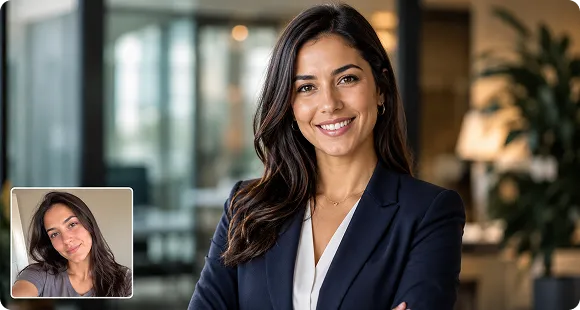
From your next job interview to a wedding invite, we give you a camera-ready formal portrait without booking a photographer. Drop in a casual selfie and get back something boardroom-ready.
From your next job interview to a wedding invite, we give you a camera-ready formal portrait without booking a photographer. Drop in a casual selfie and get back something boardroom-ready.
Dial in exactly the formalwear you want. The generator handles fabric texture, lapels, and fit so the suit sits naturally on your frame, then blends lighting and skin tone for a seamless result.
Dial in exactly the formalwear you want. The generator handles fabric texture, lapels, and fit so the suit sits naturally on your frame, then blends lighting and skin tone for a seamless result.
Every output is built to pass as a real photo, not an obvious edit. Faces stay recognizable, suits stay believable, and the lighting holds up at full resolution so you can use the image anywhere it counts.
Every output is built to pass as a real photo, not an obvious edit. Faces stay recognizable, suits stay believable, and the lighting holds up at full resolution so you can use the image anywhere it counts.
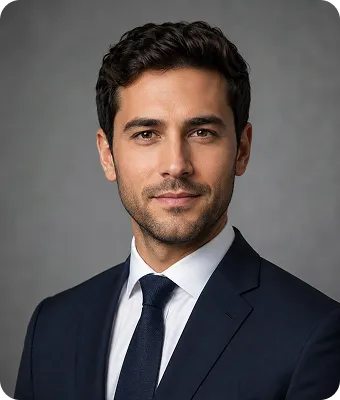
Prompt
Navy Three-Piece - Tailored navy suit with a waistcoat and pocket square, slim modern fit - polished without trying too hard.
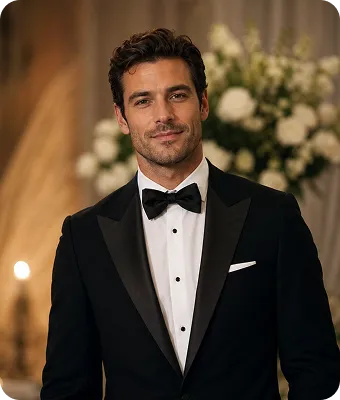
Prompt
Slim-Fit Blazer (Business Casual) - Light grey or brown blazer over an open collar, relaxed and approachable for startups and creatives.
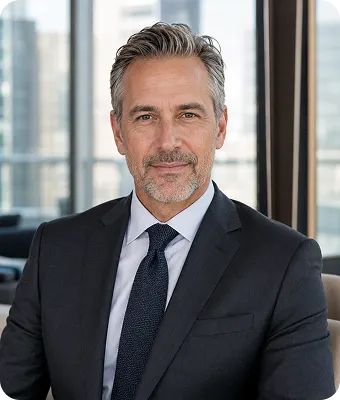
Prompt
Black Tuxedo - Formal black tux with a bow tie for weddings, galas, and black-tie events.
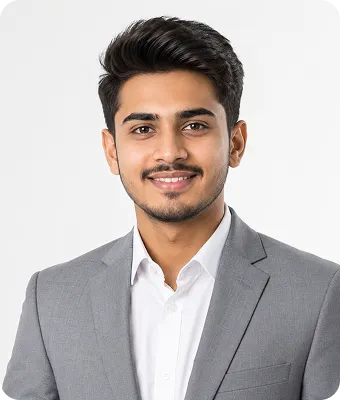
Prompt
Double-Breasted Power Suit - Structured double-breasted jacket in dark navy or charcoal for an executive, in-charge look.
Uploaded a phone selfie and got a clean navy-suit headshot for my LinkedIn the same afternoon. Recruiters started replying within a week - no photographer needed.
Marcus Bell @marcusbuilds
Software Engineer
I needed a formal portrait for my wedding website and didn't have a good one. Picked the tuxedo style and it looked like a real studio shot.
Daniel Okafor @danokafor
Groom-to-be
Used it to standardize headshots for my whole sales team. Same charcoal suit, same background, done in an afternoon. A couple needed a second pass but the results were sharp.
Priya Nair @priyaleads
Sales Manager
The three-piece option is excellent. The fit, the lapels, the lighting - it actually sits like a real suit on my frame, not a cardboard cutout.

Thomas Reyes @t_reyes
Real Estate Agent
Text-to-image is underrated here. I typed "man in a light grey business suit, office background" and got exactly what I pictured for a pitch deck.
Kevin Zhang @kevinz.design
Founder
Great for a quick, confident dating-profile photo. Swapped my hoodie selfie for a tailored blazer look and it felt natural, not fake. Wished for a few more background choices.
Andre Foster @andrefoster
Marketing Lead
AI Suit Generator
Yes - you can try it free and generate suit portraits online with no software to install.
No. Upload a photo or type a short description, pick a style, and the AI does the tailoring, lighting, and blending for you.
Yes. Upload a clear, front-facing portrait and the AI fits a suit to your body, pose, and lighting while keeping your face recognizable.
Use a sharp, well-lit photo with your shoulders visible and a simple background. For text prompts, name the suit style, color, and setting - for example, "man in a charcoal three-piece suit, office background."
Business suits, three-piece suits, double-breasted jackets, slim-fit blazers, tuxedos, and business casual - in charcoal, navy, black, grey, brown, and white, with optional ties and pocket squares.
Absolutely. The tool is built for professional headshots, business profiles, formal events, and wedding or invitation photos, with aspect ratios for each.
Yes. The AI matches lighting, skin tone, and fabric texture so the suit blends naturally, and you get high-resolution output you can use anywhere.
Your uploads are processed securely and used only to generate your result. The images you create are yours to use for your profiles, applications, and personal projects.
Stop putting off that professional photo. Upload your picture or describe the look, choose your suit, and let Visiva hand you a polished, formal portrait ready for anywhere you need to make an impression.